
Move / Copy Products
Find the products. Choose their category. Review every change.
Release candidate Version 1.1.0 · Separate OpenCart 3 & 4 packages
Less catalogue housekeeping
Move one product or organise a whole selection.
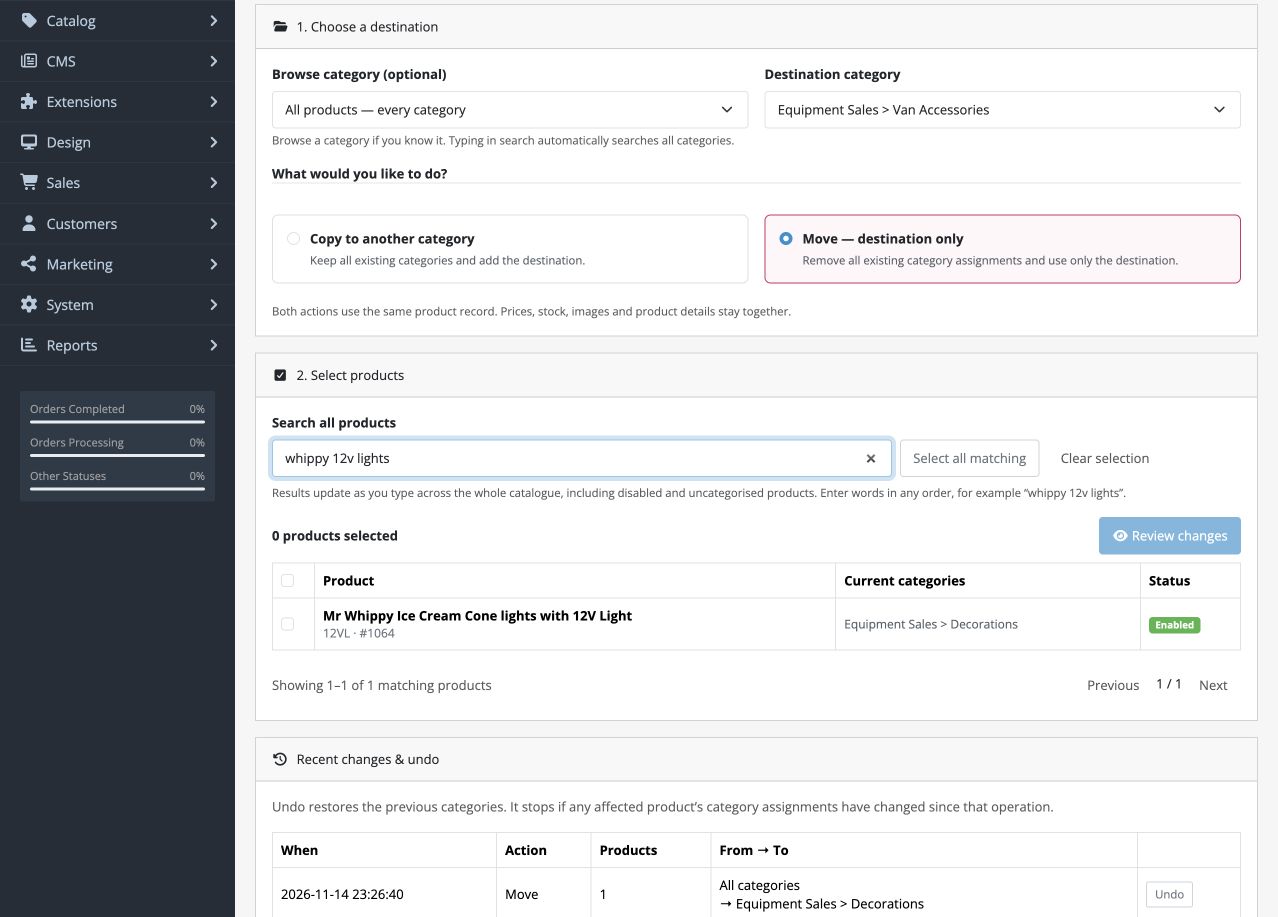
Search across the catalogue as you type, even when you don’t know where a product is filed. Select your matches, choose a destination and inspect the current and resulting categories before applying.
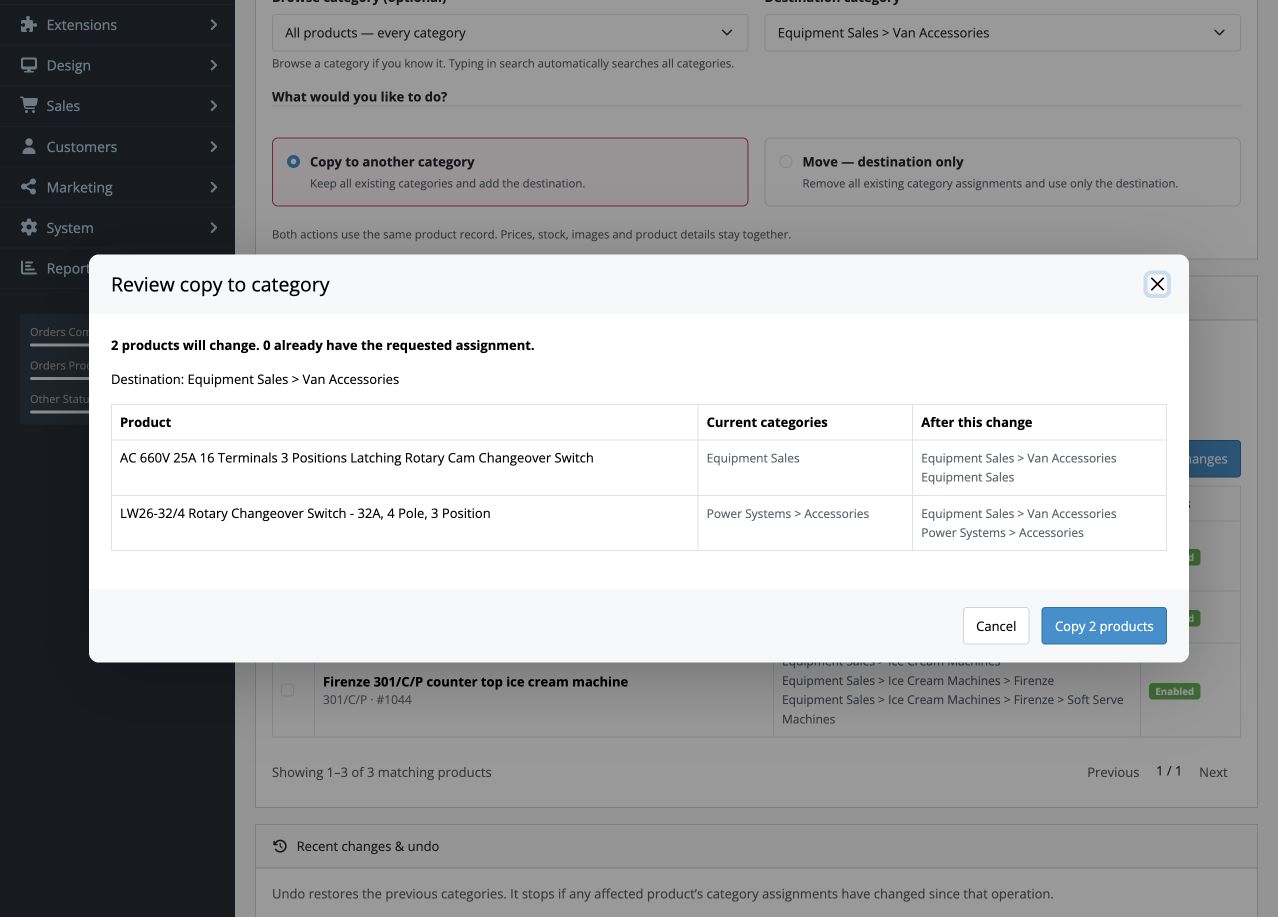
Copy to another category
Add the destination while keeping every existing category. The same product can appear in several places.
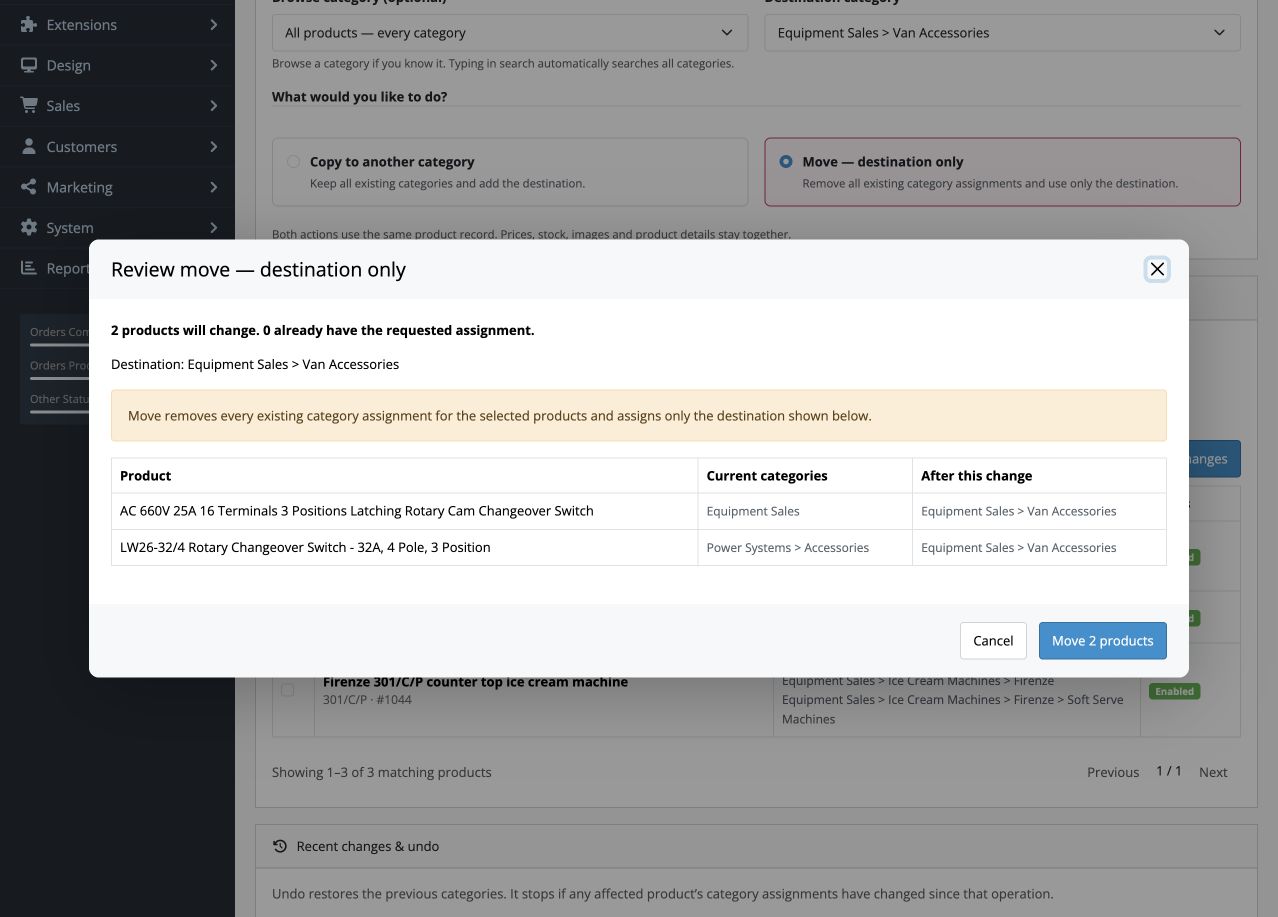
Move — destination only
Remove all existing category assignments and leave the product in the destination category only.
One product, one set of details. Neither action duplicates the product. Options, option prices, stock, images and descriptions stay with the same record. A price update applies wherever that product appears.
- Live search across names, models, descriptions, brands, product codes and category paths.
- Find disabled and uncategorised products; see their current categories beside each result.
- Select individual products, the current page or all matching products.
- Review before/after assignments and skip products already assigned correctly.
- Undo recent changes, with checks that protect later category edits.
Real administration screens
See exactly what will change.
Captured on OpenCart 4.1.0.4. Open an image for full size. These are review screens; the sample changes were not applied.
Compatibility and verification
| Package | Validation | Requirements |
|---|---|---|
| OpenCart 4 4.1.0.4 | Installed admin interface and transaction tests. Screenshots show this version. | PHP 8+ and OpenCart’s own PHP requirements. |
| OpenCart 3 3.0.3.8 / 3.0.4.1 candidate | Isolated engine, schema and native-installer tests. Full stock-store browser acceptance remains pending. | PHP 7.4+ syntax; tested on PHP 8.2.35. Use a PHP version supported by your store. |
InnoDB required: product, category and product_to_category tables must be transactional. Installation refuses MyISAM tables and does not convert them. Many OpenCart 3 stores need a separately planned conversion first.
Up to 5,000 products. English admin interface. Modern browser required. Search uses descriptions in the current admin language. Custom admin layouts, third-party extensions and other OpenCart releases require separate testing. The storefront theme is not changed.
Destination categories must be available to all stores assigned to the selected products. The last 20 operations appear in Undo; older audit records are retained.
Installation and downloads
Keep an off-server backup and test on a staging copy first. Use the package for your OpenCart version, retaining its filename.
- Upload through Extensions → Installer and install the package files.
- Go to Extensions → Extensions → Modules and install Move / Copy Products.
- Refresh admin and open Catalog → Move / Copy Products. Set staff permissions as explained in the README.
SHA-256 checksums · README and changelog included
Installation cleans its upload/staging resources. Installed files, audit history and recovery resources remain. The README explains the native installer’s cleanup behaviour for each version.
Marketplace preparation: the description, screenshots and separate packages form the submission material. These release candidates have not been submitted to, approved by or published on OpenCart Marketplace.
Compatibility and support Installation serviceOptional installation service
We can install it on your server.
ezyNet can install and verify Move / Copy Products on your hosting, check compatibility and fix related installation issues. We review your store first and agree the scope and price before work begins. Installation and store-specific compatibility work are quoted separately from extension support.
Installation and verification
- Check your OpenCart version, PHP and database compatibility.
- Install the extension and configure staff permissions.
- Test search, copy, move and undo using agreed test products.
Help when changes are needed
Database conversion to InnoDB, custom admin layouts and conflicts with other extensions can be assessed and quoted separately. Any changes require your approval, with a verified backup and a rollback plan.
Send your store address, OpenCart version and a brief description of the help you need. We will arrange the required access securely after reviewing the request.
Request installation help